Landing
分屏 Hero
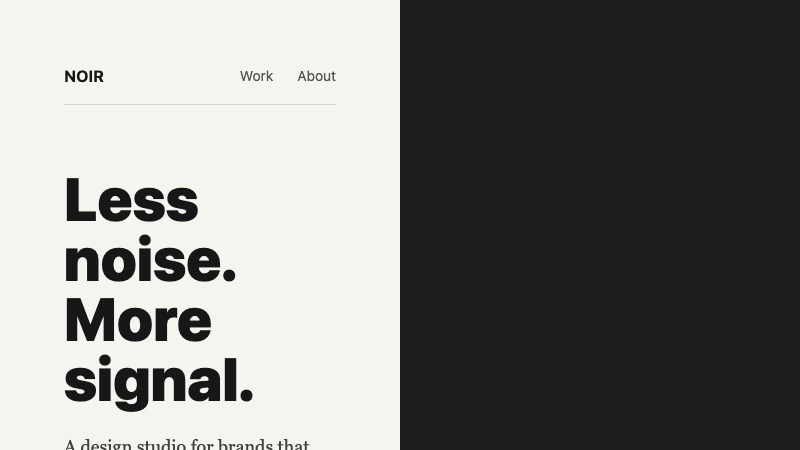
大胆的分屏 hero,对比排版、全出血图片面板和极简导航。
作者:mcpSkills
框架
nextjs
UI 库
shadcntailwind
难度advanced
英文提示词
Create a split-screen landing hero. The left half should be a warm off-white background with a massive bold headline in a dark color, a short body paragraph in a serif font, and a simple underline text link as the CTA. The right half should be a full-bleed image panel with a subtle dark overlay and a small floating caption in the bottom corner. Add a minimal top navigation bar that spans both halves with a thin bottom rule. Use Tailwind CSS grid. No gradients, no buttons with backgrounds, no decorative shapes.
中文提示词
创建一个分屏落地页 hero。左半部分为温暖的米白色背景,放置深色超大粗体标题、衬线字体短段落,以及作为 CTA 的简单下划线文本链接。右半部分为全出血图片面板,带微妙深色叠加和右下角小浮动标题。添加一条横跨两半的极简顶部导航栏,底部带细线分隔。使用 Tailwind CSS 网格。无渐变、无背景按钮、无装饰形状。
## Overview
受印刷品启发的编辑感 hero,使用分屏形式在字体与摄影之间制造张力。
## Features
- 50/50 分屏布局
- 温暖米白色 + 深色对比
- 超大粗体标题
- 衬线正文段落
- 下划线文本 CTA
- 带标题的全出血图片面板
- 带底部分隔线的极简横跨导航
## Usage
适用于时尚、编辑、建筑或生活方式品牌落地页。
## Customization
修改 prompt 以:
- 反转分屏方向
- 添加垂直排版边注
- 将图片替换为视频循环
- 让导航滚动时才出现