Feedback
通知下拉菜单
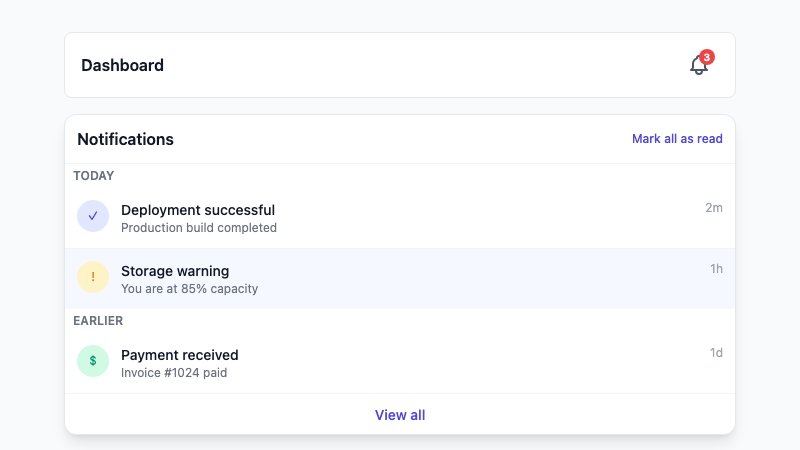
一个带未读徽章、分组项目和标记已读操作的通知铃铛下拉菜单。
作者:mcpSkills
框架
nextjs
UI 库
shadcntailwind
难度intermediate
英文提示词
Create a notification dropdown triggered by a bell icon in a navbar. Show an unread badge count on the bell. Inside the dropdown, display a list of notifications grouped by date (Today, Earlier) with icons, titles, timestamps, and read/unread states. Include "Mark all as read" and "View all" buttons at the bottom. Use shadcn/ui DropdownMenu, Button, and Badge components and Tailwind CSS. Make it keyboard accessible and responsive.
中文提示词
创建一个由导航栏铃铛图标触发的通知下拉菜单。铃铛上显示未读徽章数量。下拉菜单内按日期分组(Today、Earlier)显示通知列表,包含图标、标题、时间戳和已读/未读状态。底部包含 "全部标记为已读" 和 "查看全部" 按钮。使用 shadcn/ui DropdownMenu、Button 和 Badge 组件以及 Tailwind CSS。使其支持键盘访问并响应式。
## 概述
一个通知中心下拉菜单,让用户无需离开当前页面即可了解最新动态。包含未读指示器和快速操作。
## 功能特性
- 带未读徽章的铃铛图标触发器
- 分组通知列表
- 已读/未读视觉状态
- 全部标记为已读操作
- 查看全部链接
- 支持键盘访问的下拉菜单
## 使用方法
将提示词复制到 v0 或 Cursor 中。将通知连接到你的后端或实时服务。
## 自定义选项
修改提示词以:
- 添加通知类型筛选
- 为每个通知包含操作按钮
- 为历史记录添加无限滚动
- 无通知时显示空状态