Forms
文件上传拖放区
一个带预览、进度条和验证的拖放文件上传组件。
作者:mcpSkills
框架
nextjs
UI 库
shadcntailwind
难度intermediate
英文提示词
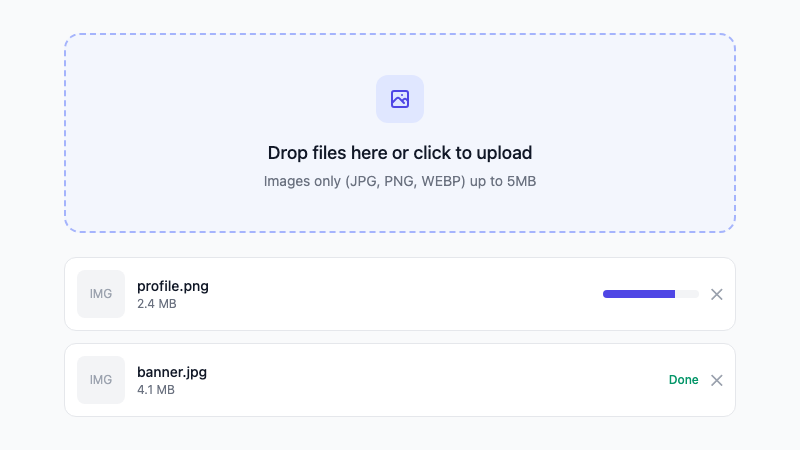
Create a drag-and-drop file upload component. Features: dropzone area with upload icon and instructions, file type validation (images only: jpg, png, webp), 5MB max size limit, file preview thumbnails, upload progress bars, individual file remove buttons, and error messages for invalid files. Use shadcn/ui Card, Button, and Progress components and Tailwind CSS. Make it responsive and accessible with proper drag state styling.
中文提示词
创建一个拖放文件上传组件。功能包括:带上传图标和说明的拖放区域、文件类型验证(仅图片:jpg、png、webp)、最大 5MB 限制、文件预览缩略图、上传进度条、单个文件删除按钮和无效文件错误信息。使用 shadcn/ui Card、Button 和 Progress 组件以及 Tailwind CSS。使其响应式且可访问,包含正确的拖拽状态样式。
## 概述
一个包含拖放、验证、预览和进度反馈的完整文件上传模式。处理常见的上传 UX 需求。
## 功能特性
- 拖放区域
- 文件类型和大小验证
- 预览缩略图
- 上传进度条
- 单个文件删除
- 错误信息提示
- 响应式布局
## 使用方法
将提示词复制到 v0 或 Cursor 中。连接到你的上传端点或存储服务。
## 自定义选项
修改提示词以:
- 支持多种文件类型
- 上传前添加图片裁剪
- 支持多文件上传队列
- 添加云端上传状态指示器