Landing
Split-Screen Hero
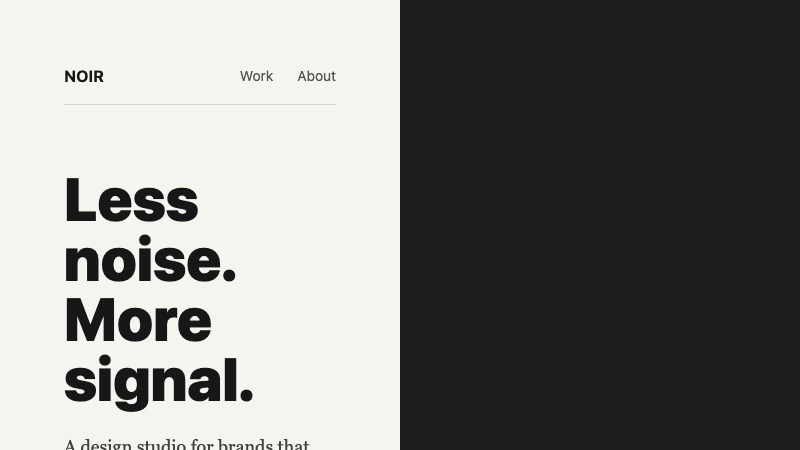
A bold split-screen hero with contrasting typography, full-bleed image panel, and minimal navigation.
by mcpSkills
Framework
nextjs
UI Library
shadcntailwind
Difficultyadvanced
English Prompt
Create a split-screen landing hero. The left half should be a warm off-white background with a massive bold headline in a dark color, a short body paragraph in a serif font, and a simple underline text link as the CTA. The right half should be a full-bleed image panel with a subtle dark overlay and a small floating caption in the bottom corner. Add a minimal top navigation bar that spans both halves with a thin bottom rule. Use Tailwind CSS grid. No gradients, no buttons with backgrounds, no decorative shapes.
Chinese Prompt
创建一个分屏落地页 hero。左半部分为温暖的米白色背景,放置深色超大粗体标题、衬线字体短段落,以及作为 CTA 的简单下划线文本链接。右半部分为全出血图片面板,带微妙深色叠加和右下角小浮动标题。添加一条横跨两半的极简顶部导航栏,底部带细线分隔。使用 Tailwind CSS 网格。无渐变、无背景按钮、无装饰形状。
## Overview
An editorial, print-inspired hero that uses the split-screen format to create tension between typography and photography.
## Features
- 50/50 split-screen layout
- Warm off-white + dark contrast
- Massive bold headline
- Serif body paragraph
- Underline text CTA
- Full-bleed image panel with caption
- Minimal spanning nav with bottom rule
## Usage
Use for fashion, editorial, architecture, or lifestyle brand landing pages.
## Customization
Modify the prompt to:
- Reverse the split direction
- Add a vertical typographic sidenote
- Replace the image with a video loop
- Make the nav disappear until scroll