Forms
Settings Page
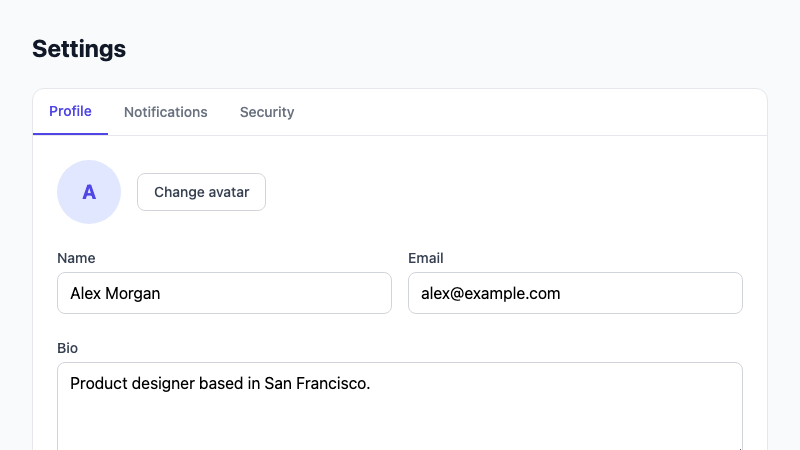
A comprehensive account settings page with profile, notifications, and security sections using tabs.
by mcpSkills
Framework
nextjs
UI Library
shadcntailwind
Difficultyintermediate
English Prompt
Create an account settings page with three tabs: Profile, Notifications, and Security. Profile tab includes avatar upload, name, email, and bio fields. Notifications tab has toggles for email, push, and marketing alerts. Security tab has current password, new password, and 2FA toggle. Use shadcn/ui Tabs, Card, Switch, Input, Button, and Avatar components and Tailwind CSS. Make it responsive and accessible.
Chinese Prompt
创建一个账户设置页面,包含三个标签:Profile、Notifications 和 Security。Profile 标签包含头像上传、姓名、邮箱和简介字段。Notifications 标签包含邮件、推送和营销通知的开关。Security 标签包含当前密码、新密码和双因素认证开关。使用 shadcn/ui Tabs、Card、Switch、Input、Button 和 Avatar 组件以及 Tailwind CSS。使其响应式且可访问。
## Overview
A complete settings page pattern covering profile, notification preferences, and security. Uses tabs to organize content without overwhelming users.
## Features
- Tabbed layout for settings categories
- Profile with avatar upload placeholder
- Notification toggle switches
- Password change and 2FA toggle
- Accessible form labels and focus states
- Responsive design
## Usage
Copy the prompt into v0 or Cursor. Connect the form to your user API and auth provider.
## Customization
Modify the prompt to:
- Add billing/subscription tab
- Include team/organization settings
- Add appearance/theme preferences
- Add danger zone for account deletion