Auth
Responsive Auth Form
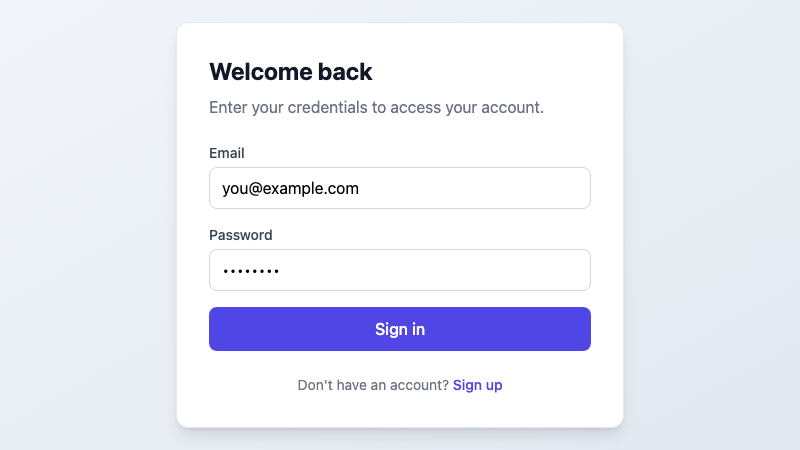
A responsive authentication form with login, signup, and password reset states, built with shadcn/ui components.
by mcpSkills
Framework
nextjs
UI Library
shadcntailwind
Difficultybeginner
English Prompt
Create a responsive authentication form component with three states: login, signup, and forgot password. Use shadcn/ui components (Input, Button, Card, Label). Include form validation, loading states, and error handling. The form should be centered on the page with a clean, modern design. Use Tailwind CSS for styling. Include a toggle between login and signup states.
Chinese Prompt
创建一个响应式认证表单组件,包含三个状态:登录、注册和忘记密码。使用 shadcn/ui 组件(Input、Button、Card、Label)。包含表单验证、加载状态和错误处理。表单应在页面居中显示,采用简洁现代的设计。使用 Tailwind CSS 进行样式设计。包含登录和注册状态之间的切换。
## Overview
A complete authentication form solution that handles login, signup, and password reset flows. Built with accessibility in mind and fully responsive across all screen sizes.
## Features
- Three form states: Login, Signup, Forgot Password
- Form validation with error messages
- Loading states during submission
- Responsive design for mobile and desktop
- Dark mode support
- Accessible form labels and ARIA attributes
## Usage
Copy the prompt into v0, Cursor, or any AI coding tool to generate the component. The generated code will use shadcn/ui primitives and Tailwind CSS.
## Customization
You can modify the prompt to:
- Add social login buttons (Google, GitHub)
- Include remember me checkbox
- Add terms of service links
- Change the color scheme