Pricing
Pricing Table
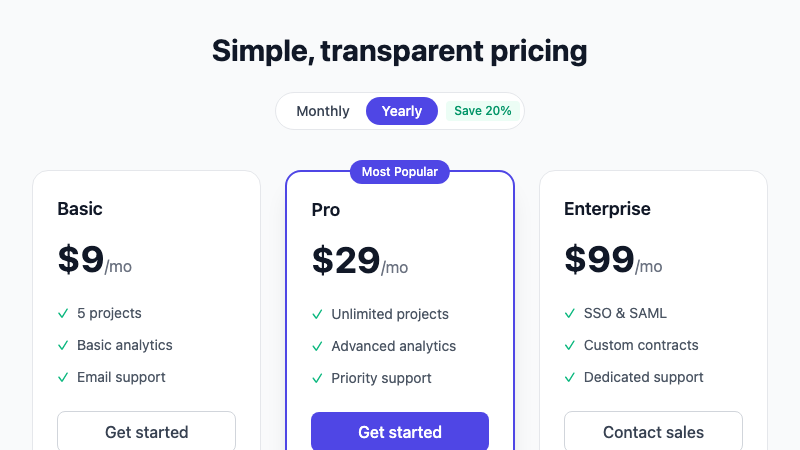
A conversion-focused pricing section with 3 tiers, monthly/yearly toggle, and feature comparison.
by mcpSkills
Framework
nextjs
UI Library
shadcntailwind
Difficultybeginner
English Prompt
Create a pricing section with 3 tiers: Basic, Pro, and Enterprise. Include a monthly/yearly toggle at the top with a "Save 20%" badge for yearly. Each card should show plan name, price, feature list with checkmarks, and a CTA button. Highlight the middle tier as "Most Popular" with a larger shadow and accent border. Use shadcn/ui Card and Button components and Tailwind CSS. Make it fully responsive and add hover lift effects.
Chinese Prompt
创建一个包含 3 个套餐的定价区域:Basic、Pro 和 Enterprise。顶部包含月付/年付切换,年付显示 "Save 20%" 徽章。每张卡片显示套餐名称、价格、带勾选标记的功能列表和 CTA 按钮。中间套餐突出显示为 "最受欢迎",使用更大的阴影和强调色边框。使用 shadcn/ui Card 和 Button 组件以及 Tailwind CSS。使其完全响应式并添加悬停提升效果。
## Overview
A pricing table designed to drive conversions. Clearly differentiates tiers and encourages users to choose the highlighted plan.
## Features
- 3 pricing tiers with clear hierarchy
- Monthly/yearly billing toggle
- "Most Popular" highlighted plan
- Feature list with checkmarks
- Responsive card layout
- Hover lift animations
## Usage
Copy the prompt into v0 or Cursor. Replace the plan names, prices, and features with your product details.
## Customization
Modify the prompt to:
- Add a comparison table below the cards
- Include a free trial badge
- Add enterprise "Contact sales" CTA
- Switch to a dark theme