Feedback
Notification Dropdown
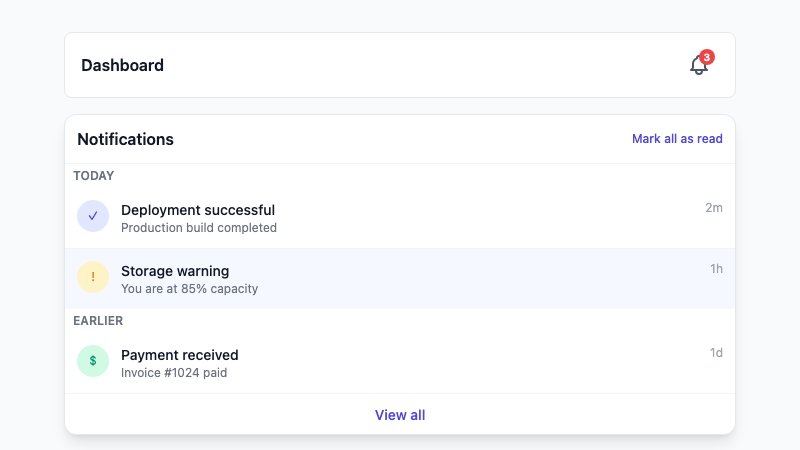
A notification bell dropdown with unread badges, grouped items, and mark-as-read actions.
by mcpSkills
Framework
nextjs
UI Library
shadcntailwind
Difficultyintermediate
English Prompt
Create a notification dropdown triggered by a bell icon in a navbar. Show an unread badge count on the bell. Inside the dropdown, display a list of notifications grouped by date (Today, Earlier) with icons, titles, timestamps, and read/unread states. Include "Mark all as read" and "View all" buttons at the bottom. Use shadcn/ui DropdownMenu, Button, and Badge components and Tailwind CSS. Make it keyboard accessible and responsive.
Chinese Prompt
创建一个由导航栏铃铛图标触发的通知下拉菜单。铃铛上显示未读徽章数量。下拉菜单内按日期分组(Today、Earlier)显示通知列表,包含图标、标题、时间戳和已读/未读状态。底部包含 "全部标记为已读" 和 "查看全部" 按钮。使用 shadcn/ui DropdownMenu、Button 和 Badge 组件以及 Tailwind CSS。使其支持键盘访问并响应式。
## Overview
A notification center dropdown that keeps users informed without leaving the current page. Includes unread indicators and quick actions.
## Features
- Bell icon trigger with unread badge
- Grouped notification list
- Read/unread visual states
- Mark all as read action
- View all link
- Keyboard accessible dropdown
## Usage
Copy the prompt into v0 or Cursor. Wire notifications to your backend or real-time service.
## Customization
Modify the prompt to:
- Add notification type filters
- Include action buttons per notification
- Add infinite scroll for history
- Show empty state when no notifications